
For an ISLC download on Windows 10, use the publisher-hosted ISLC 1.0.4.8 portable or installer file, compare the filename, byte size and SHA-256, then place it in a stable folder before the first run. Windows 10 can run the current utility within the publisher's stated compatibility range, but Windows 10 Home and Pro stopped receiving normal support on October 14, 2025. Treat software compatibility and operating-system security support as two separate decisions.
Download the verified ISLC files
Choose one current Wagnardsoft-hosted package. Portable is self-contained; installer follows a conventional setup path. Both buttons use final publisher file URLs rather than mirrors or repackaged downloads.
Verified September 18, 2026: ISLC 1.0.4.8 portable 706,056 bytes; installer 1,221,976 bytes. Compare the SHA-256 values in the verification section before running either file.Does ISLC work on Windows 10?
The current publisher description places ISLC within the Windows 10 generation, including Windows 10 Creator Update and later systems. That makes the utility a reasonable compatibility candidate for a supported Windows 10 installation, but the exact result still depends on architecture, permissions, security software and the workload that produces memory pressure.
Windows 10 compatibility is not the same as Windows 10 lifecycle support. Microsoft ended normal support for Windows 10 Home and Pro on October 14, 2025. Installing a compatible utility does not restore security updates, and changing standby-memory settings cannot replace an eligible Extended Security Updates path or a move to a supported Windows release.
Start with the narrow question: does your Windows 10 system repeatedly show a low-available-memory symptom at the same time as an unusually large standby list? If not, ISLC may add another variable without solving the problem. Use Task Manager first and keep the first comparison reversible.
- Creator Update or a later Windows 10 build is the relevant publisher compatibility boundary.
- Windows 10 Home and Pro ended normal support on October 14, 2025; software compatibility does not change that lifecycle fact.
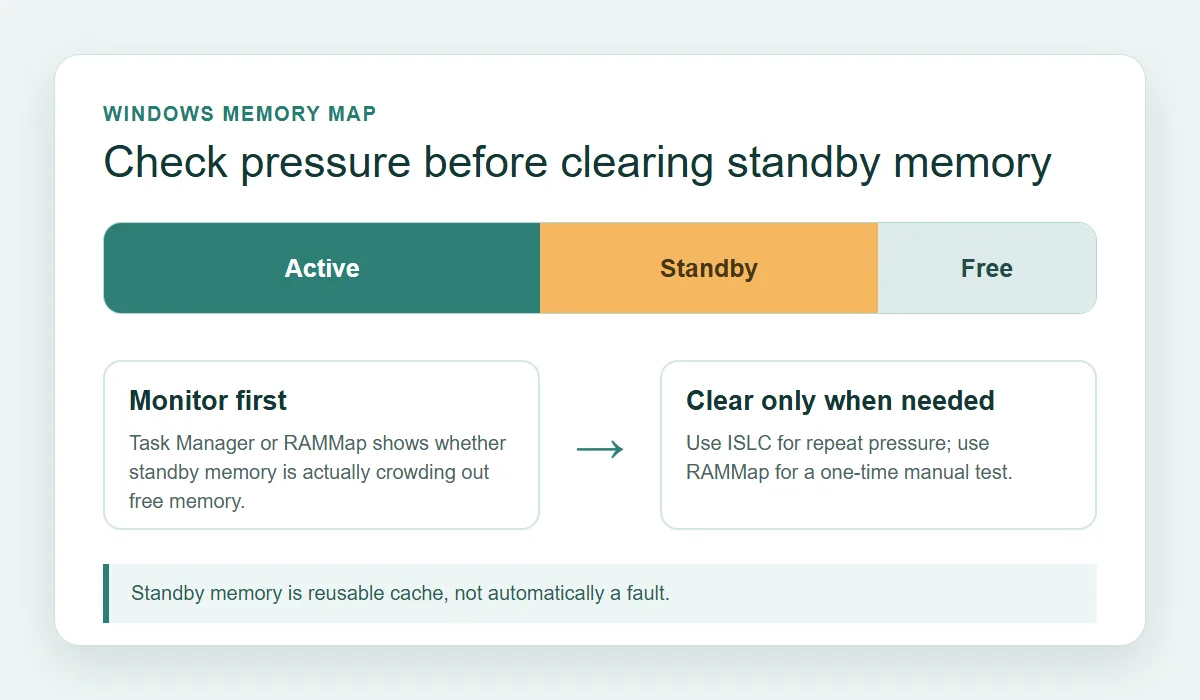
- A large standby value alone is not proof that Windows needs a purge.
- Test one workload and one configuration change at a time.
Choose the portable or installer ISLC download
The portable and installer packages run the same utility, but they suit different maintenance habits. Portable keeps the executable and its configuration in a folder you choose. It is useful when you want to move or remove the tool manually, provided startup tasks are updated if that folder changes.
The installer is more familiar when you want a conventional Windows setup path and an installed-program workflow. It does not make the memory behavior safer by itself. The important trust boundary is still the publisher host, the file identity and the settings you choose after installation.
Do not download both packages for normal use. Pick one, record which package you selected, and keep the other out of the first test so a second executable or configuration folder does not make the result difficult to explain.
- Portable: self-contained folder, manual placement and removal.
- Installer: conventional setup path and easier installed-program maintenance.
- Both current files are hosted on download.wagnardsoft.com.
- Do not move a portable folder after configuring startup without updating the task or shortcut.
| Package | Best fit | Watch for | First-run choice |
|---|---|---|---|
| Portable | A stable personal tools folder | Moving the folder can break shortcuts or startup tasks | Extract once, verify, then run manually |
| Installer | A conventional installed-program workflow | Review the selected install path and Windows prompts | Install once, verify, then run manually |
Verify the Windows 10 download before running it
A current label is not enough to prove that a file is the file you intended to download. Confirm that the address uses the Wagnardsoft download host, check the exact filename and byte size, and compare SHA-256 with the maintained publisher release thread. This identifies an altered or incomplete file; it is not a universal safety guarantee for every executable on the internet.
For the check recorded on September 18, 2026, the portable file is `ISLC v1.0.4.8.exe` at 706,056 bytes with SHA-256 `599315A1852B951E0ADAE2BE46FCE30BB32AAB7F8A4C9112471A5A88320E3085`. The installer is `ISLC v1.0.4.8_setup.exe` at 1,221,976 bytes with SHA-256 `6292D1C55F671AEF93C4E8E2DF554753E7457B361771844FE92A812801956E3C`.
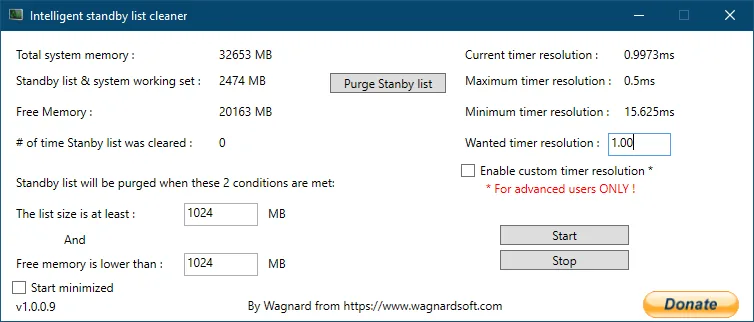
Windows Defender or SmartScreen can still display an internet-download warning. Read the publisher and filename first, keep protection active, and stop if the prompt shows a different host or an unexpected package. The real ISLC interface image below is included as orientation only; it is not a substitute for checking the file you downloaded.
- 1
Confirm the host
The final file URL should resolve to the Wagnardsoft download host, not an unrelated mirror or a renamed redirect.
- 2
Check filename and size
Match the portable or installer name and the byte count recorded above before opening it.
- 3
Calculate SHA-256
Use PowerShell `Get-FileHash -Algorithm SHA256
` and compare the complete value with the publisher reference. - 4
Keep the result
Save the verification date and selected package with your setup notes so a later update can be compared cleanly.
Install ISLC on Windows 10 and run the first test
After verification, place the portable folder or installed program in a stable location. Avoid a temporary Downloads folder when you plan to use a startup shortcut, because moving the executable later can leave Windows pointing at a missing path. Run the first session with the main window visible so you can see whether values populate and whether the process remains open.
Begin without startup automation and without custom timer resolution. The goal of the first run is to establish whether ISLC can read the system and whether the memory symptom is repeatable. The separate How to Use ISLC guide provides a longer first-run workflow, while ISLC troubleshooting is the right place for zero values, immediate exits or tray failures.
If Windows asks for administrator approval, review the file path and publisher context before accepting. Do not create antivirus exclusions merely to make an uncertain download run. A security prompt that names a different file or source is a reason to stop and verify again.
- 1
Use a permanent path
Keep the portable folder or installed location stable before configuring startup or shortcuts.
- 2
Open the main window
Confirm that system memory, standby-list and free-memory values populate instead of assuming a hidden tray process is working.
- 3
Leave optional controls off
Do not add startup or custom timer resolution to the first comparison; change one variable only after the baseline is clear.
- 4
Record a baseline
Note the workload, available memory, standby size and visible symptom before any purge or threshold change.
Use conservative settings for Windows 10 memory tests
ISLC's useful boundary is its two-condition model: the standby-list threshold and the free-memory threshold must both be reached before a conditional purge. That is different from a timer that clears memory on a fixed schedule. If available memory stays healthy, leaving useful cache alone is often the better result.
Do not copy a single value from a gaming forum and treat it as a universal Windows 10 preset. Installed memory, background applications, page-file behavior, storage speed and the actual workload change what a sensible threshold looks like. The ISLC settings guide explains polling rate, optional timer behavior and why 16 GB, 32 GB and higher-memory systems should be tested rather than assigned one magic number.
If the goal is a one-time diagnostic, Microsoft RAMMap can show physical-memory categories more clearly than a cleaner. If the same standby-pressure pattern returns across several controlled tests, ISLC may be worth keeping as a threshold-based monitor. If the symptom does not repeat, remove the extra variable and continue investigating the process, driver, storage or workload that actually needs attention.
- Measure Available, Committed and standby-related values before changing settings.
- Keep custom timer resolution separate from standby-memory monitoring.
- Use RAMMap for category-level diagnosis and a one-time comparison.
- Keep ISLC only when the same workload shows a repeatable, meaningful difference.
| Observation | Reasonable next step | Avoid |
|---|---|---|
| Healthy available memory, no repeatable hitch | Leave the cache alone and monitor the workload | Routine purges because the standby number looks large |
| Low available memory plus a repeatable symptom | Record a baseline, then test one controlled purge | Changing thresholds, timer and startup together |
| Values stay zero or the process exits | Use the troubleshooting guide and verify permissions/file | Guessing new thresholds |
| No improvement after two or three comparisons | Stop and investigate workload, process, driver or storage | Adding another cleaner to force a result |
What ISLC cannot prove on Windows 10
A lower cached-memory number is not a performance score. Windows uses spare RAM to reduce storage reads, and the standby list can rebuild as applications run. A purge can therefore change a visible number without fixing a GPU, CPU, driver, storage, game-engine or application bottleneck.
ISLC may be useful when a reproducible workload shows standby growth together with low available memory and a symptom that changes after a controlled comparison. It is not evidence that every Windows 10 PC needs a cleaner, and it cannot turn an unsupported operating system into a supported one.
Stop if two or three comparable tests show no meaningful improvement, if loading becomes slower, or if the tool introduces startup and security complications. A clean negative result is useful: it tells you to look at the workload rather than keep purging memory.
- Do not promise FPS, latency or stutter improvements from a cache purge.
- Do not run ISLC, EmptyStandbyList.exe and another RAM cleaner as overlapping scheduled tasks.
- Do not use an old version simply because a third-party page has a familiar filename.
- Do keep Windows security protections enabled and review the operating-system lifecycle separately.
ISLC Windows 10 FAQ
Can I download and run ISLC on Windows 10?
The current Wagnardsoft release is intended for the Windows generation that includes Windows 10 Creator Update and later. Verify the publisher file, version and hash first, then test the utility on your specific build. This compatibility statement does not mean Windows 10 Home or Pro still receives normal support.
What is the latest ISLC download for Windows 10?
The version verified for this guide is ISLC 1.0.4.8. The portable and installer files are hosted on Wagnardsoft's download host, with the byte sizes and SHA-256 values listed above. Check the maintained publisher thread again before a future update.
Should I choose the portable or installer version?
Choose portable when you want a self-contained folder and manual removal. Choose installer when you prefer a conventional setup path. Both packages are publisher-hosted and run the same utility; do not install both for the first test.
Does ISLC really improve Windows 10 gaming performance?
Not universally. It may help a subset of systems where repeatable standby-memory pressure coincides with a reproducible hitch, but it cannot prove or repair every CPU, GPU, driver, storage or game bottleneck. Compare the same workload before and after, and accept no improvement as a valid result.
Do I need custom timer resolution on Windows 10?
No. Timer resolution is a separate optional behavior from standby-memory monitoring. Leave it disabled during the first baseline and only compare it later when you have a measured reason and understand the trade-offs.
Is Windows 10 still supported because ISLC runs on it?
No. A compatible application and an operating-system support lifecycle are different facts. Microsoft ended normal support for Windows 10 Home and Pro on October 14, 2025. Keep security updates and an upgrade or eligible ESU plan separate from the decision to run ISLC.
Official compatibility and download references
These first-party sources were checked for the version, file identity, compatibility wording and Windows 10 lifecycle context used in this guide.
- Wagnardsoft ISLC maintained release thread — Publisher version 1.0.4.8, official portable and installer links, hashes and release notes.
- Wagnardsoft ISLC overview — Publisher description and Windows compatibility context for the current utility.
- Microsoft Windows 10 support lifecycle — Official end-of-support notice for Windows 10 Home and Pro.