

EmptyStandbyList.exe is a command-line utility that can ask Windows to empty selected memory lists. It is useful for a controlled one-time test, but it is not an automatic ISLC replacement and it does not prove that standby memory caused a performance problem. Prefer Microsoft RAMMap when you need to inspect memory first, or ISLC when you need visible thresholds and repeatable monitoring. Do not download a renamed copy from an unrelated mirror simply because the filename matches.
What is EmptyStandbyList.exe?
EmptyStandbyList.exe is associated with the WJ32 software page and is normally described as a small command-line tool for Windows Vista and later. It accepts an operation after the executable name, so it is designed for a terminal, shortcut or scheduled task rather than a graphical settings window. The best-known operation is standbylist, which requests that Windows empty the standby page list.
The standby list is cached memory, not automatically wasted or leaked memory. Windows keeps recently used data there because it can be reclaimed when applications need RAM. A large standby value can therefore be normal. Clearing it may create a short-lived increase in available memory while also discarding useful cache that Windows may soon rebuild. The result should be treated as a diagnostic comparison, not proof of a permanent optimization.
The original tool also documents other operations such as workingsets, modifiedpagelist and priority0standbylist. Those actions affect different memory lists and should not be placed into a copied batch file without understanding the target. A command that runs successfully can still be unnecessary for the system being tested.
- Command-line utility rather than a monitoring dashboard.
- Performs a requested memory-list action once per launch.
- Does not choose thresholds based on installed RAM or workload.
- Does not diagnose drivers, page-file pressure, memory leaks or storage bottlenecks.
This site does not mirror EmptyStandbyList.exe. Check the original WJ32 page and the file's identity before running any copy obtained elsewhere.
How to verify EmptyStandbyList before running it
The filename alone is not a trust signal. Any file can be renamed to EmptyStandbyList.exe, and third-party download pages can outlive the original documentation. Start from the original developer page when it is available. If the page is unavailable or the file cannot be connected to a source you trust, do not replace that missing evidence with a random mirror, a forum attachment or a guessed CDN address.
Record the source URL, download date, exact filename, byte size and a SHA-256 hash before running the file. Scan the file with the security tools you normally use, but do not describe a scan result as a universal safety guarantee. A clean result cannot prove future behavior, and a detection needs context such as the engine name, signature, prevalence and whether the file matches a known release.
Run the first test manually from an elevated terminal only if the source and file identity are acceptable. Do not begin with a scheduled task that executes at every sign-in or every few minutes. Automation can hide the timing of a problem and can repeatedly discard useful cache, making comparison harder rather than easier.
- 1
Confirm the source
Prefer the original WJ32 software page. Avoid pages that offer only a large download button with no author, history or file details.
- 2
Record file identity
Save the exact name, size, source URL, download date and SHA-256 before changing the file or moving it into an automated task.
- 3
Inspect system state first
Use Task Manager, Resource Monitor or RAMMap to record available memory, standby memory and the workload that produced the symptom.
- 4
Run one controlled action
Test one operation once, then repeat the same workload. Do not combine the test with driver, timer, power-plan and registry changes.
- 5
Remove automation if evidence is weak
If the symptom does not improve consistently, stop the task instead of shortening its interval.
EmptyStandbyList commands and their limits
A typical command places the executable path first and the requested operation second. For example, a user testing the standby list may run EmptyStandbyList.exe standbylist from an elevated Command Prompt. The command should be quoted when its path contains spaces. This example explains syntax; it is not a recommendation to schedule the command on every PC.
The main limitation is lack of context. The tool does not show why available memory is low, which process owns committed memory, whether the modified list is waiting on storage, or whether a game stutter came from shader compilation, asset streaming, a driver or CPU scheduling. Emptying a list changes one observation. It does not isolate every possible cause.
Administrative execution also matters. A failed command may reflect permissions, an incorrect path, an unsupported or misspelled operation, or a blocked file. Do not respond by disabling security controls broadly. Verify the path and source, capture the exact error and use a reversible test.
| Operation | What it targets | Practical caution |
|---|---|---|
| standbylist | Standby page list | Cached data may be useful and can be rebuilt after the clear. |
| priority0standbylist | Lowest-priority standby pages | Narrower target, but still not a diagnosis of the original symptom. |
| workingsets | Process working sets | Can cause applications to reload memory and should not be treated as routine cleanup. |
| modifiedpagelist | Modified page list | Storage and write-back behavior matter; avoid blind automation. |
EmptyStandbyList vs ISLC vs RAMMap
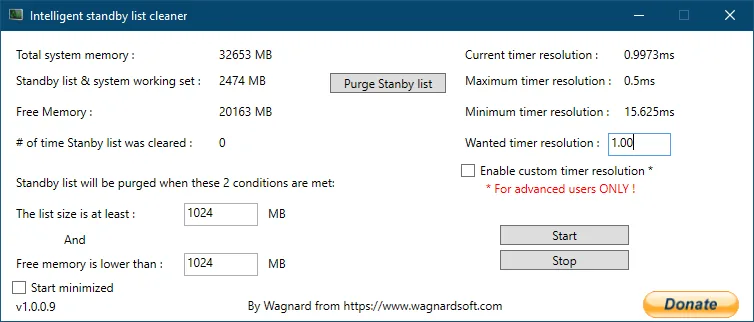
Choose the utility by the question you are trying to answer. EmptyStandbyList.exe is the smallest option when you already understand the memory list and want one scripted action. ISLC is better suited to observing two visible thresholds and purging only when both are reached. RAMMap is the strongest first step when you need to see how Windows has classified physical memory before changing it.
ISLC should not be configured as a constant purge loop. Its value is the AND relationship between a standby-list threshold and a free-memory threshold. If available memory remains healthy, the cleaner can leave useful cache alone. Review the ISLC settings guide before changing polling or timer options, and use the troubleshooting guide when the monitor is not behaving as expected.
| Tool | Best use | Interface | Automatic decision |
|---|---|---|---|
| EmptyStandbyList.exe | One controlled command or carefully reviewed script | Command line | No |
| ISLC | Repeatable monitoring with standby and free-memory thresholds | Graphical monitor | Yes, when both configured conditions are true |
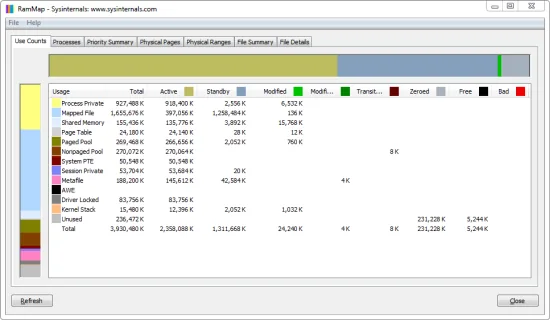
| Microsoft RAMMap | Inspect memory categories and perform a manual comparison | Graphical analysis tool | No |
Diagnose standby memory before clearing it
A useful test begins with a repeatable symptom. Note the application, map or project, time since boot, available memory, standby size, committed memory and storage activity. Repeat the same workload without a clear, then perform one manual clear and repeat it again. If the improvement is not consistent, the standby list may only be correlated with the problem rather than its cause.
Microsoft RAMMap shows categories that Task Manager compresses into broader labels. Its Use Counts and Processes views can help separate standby cache from active working sets, driver allocations and file-backed data. The Empty menu can perform a manual standby-list clear while keeping observation and action inside one documented Microsoft utility. See the Windows 11 or Windows 10 RAM cache guide for a full test workflow.
Stop clearing memory when the machine is healthy, when Windows immediately rebuilds the cache without reproducing the symptom, or when clearing causes longer load times and extra storage activity. More available memory is not automatically better if the system discarded data it was about to reuse.
- Measure before and after the same workload.
- Change one variable at a time.
- Keep custom timer resolution out of the first memory test.
- Treat repeated purges as a signal to investigate the workload, not as proof that shorter intervals are better.
Which option should you use?
Use RAMMap first when you do not yet know what is consuming physical memory. Use ISLC when repeated tests show that standby growth and low available memory coincide with a reproducible symptom and you want visible, conservative thresholds. Use EmptyStandbyList.exe only when you can verify the file, understand the requested operation and have a reason to prefer a small command-line action.
For most users, there is no need to run all three tools. A simpler chain is easier to audit: observe with Windows tools or RAMMap, test one manual action, then decide whether monitored automation is justified. If the issue is a memory leak, insufficient RAM, a driver problem, storage pressure or application behavior, repeatedly emptying the standby list can conceal the pattern without fixing it.
There is no universal best RAM-cleaning schedule. A reversible, measured setup is safer than a copied task that runs continuously.
Empty Standby List FAQ
Is EmptyStandbyList.exe the same as ISLC?
No. EmptyStandbyList.exe performs a requested command once. ISLC monitors visible standby and available-memory values and can purge when both configured thresholds are reached.
Is EmptyStandbyList.exe safe?
The name alone cannot establish safety. Use the original developer page when available, record the file identity and hash, scan it with your normal security tools and avoid unrelated mirrors. This site does not provide a mirrored executable.
Does emptying the standby list increase FPS?
It does not guarantee higher FPS. A controlled clear may help diagnose a specific standby-memory symptom, but stutter can also come from shaders, storage, drivers, CPU scheduling or the game itself.
Can I schedule EmptyStandbyList.exe every five minutes?
You can create automation, but frequent blind clearing is not a good default. Test manually first and keep automation only when repeatable evidence shows a benefit without extra loading or storage churn.
Should I use RAMMap or EmptyStandbyList?
Use RAMMap when you need to inspect memory categories and perform a documented manual comparison. EmptyStandbyList is appropriate only when you already understand the target list and want a small command-line action.
Does Windows normally clear standby memory itself?
Yes. Standby memory is reclaimable cache, and Windows normally reuses it when applications need RAM. A large standby value by itself is not proof of a fault.
Primary references
These sources document the original command-line utility and the two maintained alternatives discussed above.
- WJ32 Empty Standby List page — Original utility description and documented command names.
- Microsoft Sysinternals RAMMap — Official Microsoft memory-analysis utility and download page.
- Wagnardsoft ISLC release thread — Maintained ISLC releases, files and change history.